


cake live stream video chat
3.31.74K Reviews
App Specs
- Version
- 3.6.4
- Updated On
- License
- Free
- Downloads
- 1,000,000+
- Developer
- Net Tangerine
- Categories
- Social
- Platform
- Android
Screenshots


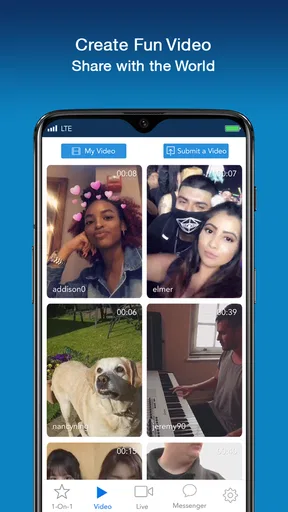


 Analysis by AppCompare
I approached cake live stream video chat as something a household might encounter rather than as a simple entertainment download. It is a social app from Net Tangerine built around live streaming, video chat, and meeting people from different parts of the world. That combination can be appealing when I want a quick conversation outside my usual circle, but it also makes the question of who is using it, where, and with what expectations much more important than it would be with a private messaging app.
The app is free to install, which lowers the barrier to trying it. Its mature 17+ rating, however, immediately changes how I would handle it on a shared phone or tablet. I would not treat it as a casual family app, and I would not hand over an already signed-in device without first checking the account and the surrounding conversation context. In my experience, the best way to enjoy this kind of service is to see it as an adult social space that needs clear personal boundaries.
How it feels in a shared household
A realistic example is a phone used by several people at home. One person may use it for a short live session in the evening, another may need the same device for messages, and a younger family member may pick it up without realizing what kind of app is open. That is where cake live stream video chat becomes less straightforward than its short description suggests. The live format is immediate and unpredictable, while video chat adds a more personal layer than simply watching a public clip.
I would keep my use separate from general household browsing. Before opening a live room, I would check that I am using my own account and that nobody else is likely to pick up the device during a private conversation. If I were sharing a tablet, I would avoid leaving an active session on screen, especially because a live room can continue to look inviting even when I have finished using it.
This is not an argument against the app. It is a practical distinction between a social discovery tool and a family-friendly video service. A household can share the hardware, but that does not mean everyone should share the account, the conversation history, or the assumptions about who may appear on camera. The device can be shared; the social identity should not be.
For an adult who enjoys spontaneous interaction, the appeal is easy to understand. I can move from watching a live broadcast to considering a direct video conversation, which feels more immediate than posting a comment and waiting for a response. The international focus also gives the experience a different rhythm from a local group chat. I may meet people whose interests, language, and daily routines are unlike mine.
That same openness can feel tiring. Live social apps reward attention, and I found that the experience works best when I enter with a specific purpose: watch for a while, have a short conversation, or meet people around a particular interest. Opening it with no limit in mind can turn into aimless scrolling and repeated attempts to find a room that feels comfortable.
Worth Reading Before You Choose

EA SPORTS FC Mobile 26 Is a Bigger Football Game, but It Takes Time

Flipboard Shows What News Apps Must Do Beyond the Feed

Switching to Android Auto Means Rethinking Your Driving Routine

Google Calendar Makes a Crowded Week Easier to Manage

Ludo King Makes the Most of the Minutes Between Plans

Baby Panda World Brings Quick Play to Modern Phones, but Its Game Library Feels Busy
Starting without letting the app take over the device
The setup is simple in the sense that the service is free and intended for quick social access, but I would still take a few minutes before using it seriously. I would choose a profile name that does not reveal my full identity, avoid using a household email or shared contact details where possible, and decide in advance whether I want to appear on camera. Those choices matter more here than they do in a standard text-based community.
I would also establish a personal rule for new contacts: no immediate move to another messenger, no sharing of a home address, and no assumption that a friendly live conversation equals trust. The app is designed for meeting people, not for proving who they are. A pleasant exchange can be genuine and still remain limited to the platform.
On a shared device, I would add a second boundary: do not rely on simply closing the screen. I would sign out when appropriate, remove the device from the common charging area while using video chat, and make sure the next person cannot accidentally continue a conversation. These are ordinary habits, but live video makes them more valuable because the consequences of an open session are more visible than an unread text message.
There is also a financial boundary worth setting. The app is free, yet optional purchases range from under a dollar to nearly two hundred dollars per item. I would never let a shared device become a place where someone can tap through a purchase without understanding the cost. If I were evaluating the app for a household, I would discuss spending before anyone used it and keep the app-store payment setup under the account holder’s control.
That is one of the less obvious trade-offs here: free access does not mean a completely cost-free social experience. The right approach is not to assume purchases will happen, but to treat them as a separate decision from installing the app. A person who only wants to watch and chat should not feel pressured to spend, and a shared-device user should be especially careful about accidental taps or misunderstood virtual transactions.
Coordinating conversations and live time
Live video works better when I coordinate it with the people around me. If I am in a common room, I would use headphones when appropriate, tell others that I am joining a conversation, and avoid pointing the camera toward people who have not agreed to be visible. This is particularly important in a household because a background can reveal more than intended: family photos, documents, a school uniform, or the layout of a home.
I would also avoid treating a live room as a private appointment unless the other person and I have clearly agreed on that. Someone may join or leave, the tone may shift, or the conversation may become uncomfortable. Keeping sessions short at first makes it easier to leave without feeling rude. A useful personal limit is to end a conversation as soon as I notice pressure to reveal personal information or move somewhere less transparent.
For people coordinating across time zones, the international nature of the app can be both a strength and a nuisance. A conversation that feels easy one day may be difficult to repeat because the other person is active at a different hour. I would use a simple plan: agree on a broad time window, keep the first meeting brief, and avoid promising regular contact until the interaction has proved reliable. That prevents the app from turning a casual meeting into an obligation.
Another practical tip is to separate watching from participating. When I am only exploring, I would keep the camera and microphone decisions deliberate rather than joining every room as if I were ready to talk. When I want a real exchange, I would choose a quieter setting and prepare a topic. This small distinction improves the quality of the interaction and reduces the chance of appearing on camera while distracted, surrounded by other people, or handling private household tasks.
Compared with ordinary social networks, cake live stream video chat feels more immediate but less carefully filtered by the pace of text. Compared with mainstream video-calling tools, it is more oriented toward discovery and meeting unfamiliar people, rather than calling contacts I already know. That makes it a better fit for curiosity and spontaneous socializing than for a family meeting, work discussion, or dependable appointment.
Age, trust, and the mature audience
The mature 17+ rating is central to my recommendation. I would not install this on a child’s device, and I would not assume that a young person is protected simply because the app is being used in a living room. A public area helps with awareness, but it does not replace age-appropriate judgment. The live format can expose users to conversations and behavior that are difficult to predict in advance.
For adults in a household, I would explain the age boundary plainly rather than making the app mysterious. If a teenager has access to a shared device, the account should not be left open, and the adult owner should understand that the app is not intended to function as a supervised family chat. I would also make it clear that an unknown person on video remains an unknown person, even after several friendly conversations.
Trust should build slowly. I would avoid sharing a surname, exact location, daily routine, workplace details, travel plans, or images of other household members. I would never send money to someone met through a live conversation, and I would treat urgent requests, romantic pressure, or demands for secrecy as reasons to end contact. These are not special tricks for this one app; they are essential habits for any service that combines strangers, live video, and direct interaction.
One useful way to judge a conversation is to notice how the other person responds to a small boundary. If I say I do not want to turn on my camera, move to another service, or discuss where I live, a respectful person should accept that without argument. Pressure is more informative than charm. This is the kind of practical test that a store description cannot provide, but it makes a major difference to whether the app feels manageable.
I also recommend remembering that the camera works both ways emotionally. A live exchange can feel more trustworthy because I can see a face, yet video is not proof of identity or good intentions. Lighting, presentation, and a warm conversation can create confidence quickly. I enjoy the human feeling of live chat, but I keep my conclusions modest until someone has shown consistent respect over time.
What the current app profile suggests
cake live stream video chat has been available since December 15, 2016, and its current version is 3.6.4. It supports Android devices running version 8.0 or later, so owners of older phones should check compatibility before planning to use it on a spare household device. I appreciate that the requirements are not aimed only at the newest hardware, although an older phone may still be less comfortable for long video sessions depending on its camera, battery, and connection.
The app has passed the million-install mark, which tells me it has reached a substantial audience beyond a small experimental community. Its average rating is 3.3 from roughly eighteen thousand ratings, alongside about one thousand seven hundred written reviews. I read that combination as a reason to keep expectations balanced: there is clear interest in the concept, but the overall experience is not universally smooth or satisfying.
Those figures do not decide whether it is right for me. Live social apps are especially sensitive to the quality of the people available at the moment, the comfort of the community, and how well the interface supports quick interactions. A person who likes spontaneous discovery may overlook some rough edges, while someone expecting the polish and predictability of a private calling app may be disappointed.
The developer is Net Tangerine, and I would keep the app updated through the normal store process rather than relying on an old installation copied to a shared device. That is a sensible habit for any social app, particularly one involving accounts and video. I would also review the app after installing it, not just once, because my comfort with the service depends on how the current version behaves in actual use.
Who should choose it, and who should skip it
I would recommend trying it to an adult who enjoys meeting unfamiliar people, can leave a conversation easily, and is comfortable making careful decisions about camera use and personal information. It may suit someone who finds ordinary text feeds too distant and wants a more human, immediate way to interact across countries. It is also a reasonable option for a short social break when I want discovery rather than a structured group activity.
I would steer a user toward a conventional messaging or video-calling service if the main goal is contacting relatives, coordinating a household, or holding a reliable appointment. Those tools are usually a better match when everyone is already known and the priority is control over who joins. For public broadcasting, a platform built primarily around creators and scheduled content may also be a better fit than an app centered on spontaneous video chat.
I would skip this app entirely for a child, for anyone who feels pressured by live interaction, or for a person who wants a quiet, private experience with no unexpected social contact. It is also not ideal for someone who dislikes setting boundaries repeatedly. The app’s value comes from openness, but openness is exactly what makes it unsuitable for users who need a tightly controlled audience.
People who are sensitive to spending should decide whether the free entry point is enough for them before installing. The purchase range is broad, and even if I never buy anything, I would not use a shared payment-enabled device casually. The right question is not whether the app can be used for free; it can. The better question is whether I can keep social curiosity and optional spending completely separate.
My household verdict
After looking at it through the lens of shared use, I see cake live stream video chat as an adult social discovery app rather than a general household utility. I like the directness of live interaction and the possibility of meeting people beyond my normal circle. I also think the experience depends heavily on the user’s judgment, because the same immediacy that makes a conversation exciting can make a poor boundary harder to undo.
My preferred setup would be one adult account on one person’s device, with the session closed when finished, no younger users browsing freely, and a clear rule that household members are never shown on camera without consent. I would keep conversations short at first, avoid moving off-platform quickly, and treat every new contact as a stranger until their behavior proves otherwise.
The 3.3 average rating and mature age classification make me cautious rather than dismissive. This is not the app I would choose for family coordination, private calls with trusted contacts, or a child’s first social platform. It is the app I would consider when I specifically want open-ended live conversation and accept the responsibility that comes with it.
My final recommendation is therefore conditional but positive: adults who understand the boundaries should give it a careful try, while households should not mistake a free download for a shared family experience. Use it as a personal social space, not as an unattended app on a communal screen. That simple distinction captures both its strongest quality and its biggest practical limitation.
Pros
- Meet people worldwide through live video conversations.
- Interactive broadcasts make chats feel more personal and engaging.
- Simple interface makes it easy to browse live rooms.
- Useful filters help discover streams matching your interests.
- In-app interactions can help users build new social connections.
Cons
- Some streams may contain mature or unsuitable content.
- Privacy risks exist when sharing video or personal details publicly.
- Frequent notifications can become distracting.
- The quality of chats depends heavily on the broadcaster’s connection.
- Some features or virtual interactions may require in-app purchases.
FAQs for cake live stream video chat
What is Cake Live Stream Video Chat, and what can I do with it?
Cake Live Stream Video Chat is a social entertainment app centered on live broadcasts and real-time interaction. After creating an account, users can browse live rooms, watch creators, send messages, react to broadcasts, and sometimes join conversations through audio or video features. Available tools may vary by region, account level, and the current version of the app.
Is Cake Live Stream Video Chat free to download and use?
The app is generally available to download at no initial cost, but some features may require in-app purchases. Virtual gifts, coins, premium interactions, subscriptions, or other paid items can be offered during live streams. Before confirming a purchase, check the displayed price and payment details carefully. Parents should also review device purchase settings if children use the device.
Do I need to create an account to watch live streams?
You may be able to preview or browse some live content without completing a full profile, but an account is usually needed for interactive features. Registration may allow you to follow hosts, comment, send gifts, participate in chats, and personalize recommendations. Depending on the sign-up method, the app may request an email address, phone number, social login, or other basic profile information.
Is Cake Live Stream Video Chat safe for teenagers and younger users?
Because live-streaming platforms contain user-generated and real-time content, the experience may not be suitable for every age group. Conversations, broadcasts, and private interactions can change quickly and may include mature language or behavior. Review the app’s age rating and privacy policy before installing it, use available blocking and reporting tools, and avoid sharing personal information with strangers.
What should I do if I encounter inappropriate content or unwanted messages?
If a broadcast, comment, or private message seems abusive, suspicious, or inappropriate, use the in-app report and block options whenever available. Do not send personal details, passwords, payment information, or private images to other users. You can also adjust notification, privacy, and message settings to reduce contact. For serious threats, scams, or harassment, save relevant evidence and contact the appropriate authorities.


